How to Know If Your Child’s Autism Evaluation Is Done Right
Kids|March 20, 2026That Messy Room? ADHD Is Running The Show Behind It
Kids|March 19, 2026High-Protein Foods to Support Your Baby's Brain Development
Pregnancy|January 6, 2026Best Online Coding Classes for Kids: Fun, Interactive, and Beginner-Friendly
Kids|October 11, 2025Protect Your Kids Online: Must-Have Parental Control Apps
Family lifes|September 28, 2025Useful Baby Care Tips Every First-Time Parent Should Know
Baby|September 28, 2025Baby Monitor With Pan Tilt Camera: Why You Need It And Top Models
You're in the kitchen, finally sitting down for a meal, but your ears are ringing with phantom cries. Is the baby actually awake, or is it just your imagination? Let's find the perfect baby monitor with a camera so you can stop guessing and start relaxing.
Why A Pan-Tilt Baby Monitor Camera Is A Game Changer
When you first bring a newborn home, they stay exactly where you put them. A basic, fixed-lens baby camera works fine for a few months. But once that baby starts rolling, scooting, and eventually standing up in the crib, a stationary view becomes useless. You'll find yourself staring at an empty corner of the mattress while your little one is huddled in the blind spot right under the camera.
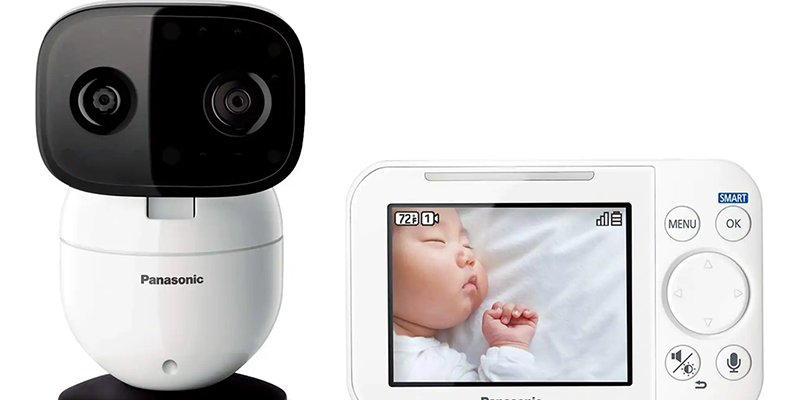
A pan-tilt-zoom (PTZ) baby monitor camera solves this frustration. It allows you to remotely move the lens up, down, left, and right using either a dedicated handheld monitor or your smartphone. If your toddler decides to climb out of bed or play in the corner of the room, you can follow the action without physically entering the room and risking a ninja wake-up. This flexibility is the difference between a glance at a screen and a stressful trip down the hallway.
Must-Have Specs: What Actually Matters For Your Video Baby Monitor
Don't get distracted by flashy marketing terms. When shopping for a video baby monitor, focus on these four practical pillars to ensure you aren't squinting at a blurry mess.
1. Resolution And Image Clarity
Most affordable cameras offer 720p resolution, which is fine, but if you want to see if your baby's eyes are open or if their chest is rising and falling, look for 1080p. High definition allows you to use the digital zoom feature without the image turning into a pile of unreadable pixels.
2. High-Quality Infrared Night Vision
Your monitor will spend 90% of its life showing you a dark room. Look for a baby camera with invisible IR LEDs. Some cheaper models have a faint red glow when night vision is on, which can distract or scare a sensitive infant. You want a crisp, black-and-white image that looks clear even in pitch-black conditions.
3. Audio Sensitivity And Two-Way Talk
A good baby monitor with a camera should act like a walkie-talkie. Two-way audio isn't just for singing lullabies; it's a practical tool for the toddler years. Sometimes, simply hearing your voice over the speaker telling them to lie back down is enough to settle them without you having to walk into the room and reset the going to sleep clock.
4. Battery Life Of The Parent Unit
If you choose a non-WiFi model with a dedicated screen, check the battery mAh. You want a screen that can last at least 6–8 hours with the display on, or 12+ hours in ECO mode (where the screen only turns on when it detects sound). There is nothing more annoying than a monitor that dies right in the middle of your favorite TV show.
WiWi-Fi. Non-WiFi: Which Video Baby Monitor Is Right For You?
This is the biggest decision you'll face. Both systems have loyal fans, but they serve very different lifestyles.
The Wiwifiaby Monitor:
A Wi-Fi-by-monitor connects to your home internet and streams video to an app on your phone.
- Pros: You can check on the baby from anywhere—the office, the grocery store, or even while traveling. You also get smart features like sleep tracking and humidity sensors.
- Cons: It relies entirely on your internet speed. If your Wi-Fi is spotty, the feed will lag or cut out. There is also a small but real risk of hacking if you don't secure your network.
The Non-WiFi (Hacker-Proof) Monitor:
These use a closed-loop system (usually FHSS technology) to send the signal directly from the camera to a dedicated handheld screen.
- Pros: They are plug-and-play and don't require an app. They are virtually impossible to hack from outside the home. They work even if your internet goes down.
- Cons: The range is limited. Once you step out into the backyard or go to a neighbor's house, you'll lose the signal. You also have one more device to keep charged.
If you are a stay-at-home parent or have a smaller house, a non-WiFi model is usually the most reliable. If you are a working parent who wants to peek in during the day, a Wi-Fi baby monitor is the clear winner.
Top Recommendations Based On Your Budget
Choosing a baby monitor with a camera can feel overwhelming, given the hundreds of brands on Amazon. Here are three specific recommendations that consistently perform well in real-world homes.
The Premium Choice: Nanit Pro (Wi-Fi)
If you want data, this is it. The Nanit isn't just a baby camera; it's a sleep coach. It tracks how many times your baby woke up and how long it took them to fall asleep. It uses a special fabric pattern on the swaddle to monitor Breathing motion without any electronics coming into contact with the baby's skin.
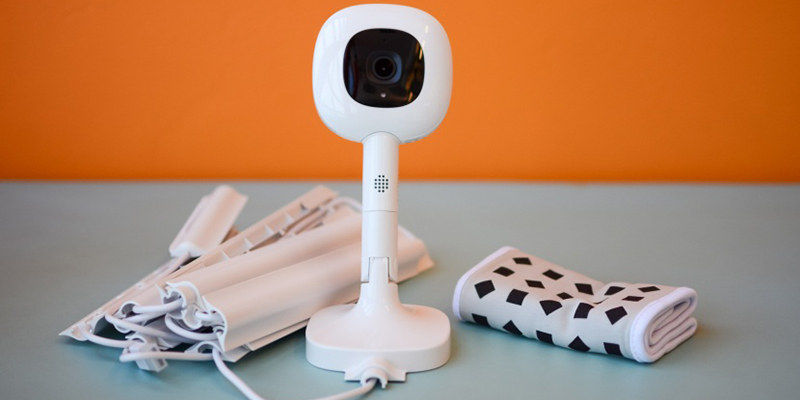
Best for: Parents who love stats and want to see their baby from their phone.
The Reliable Workhorse: Infant Optics Dxr-8 Pro (Non-WiFi)
This is widely considered the gold standard for privacy-focused parents. It features an active noise-canceling chip that filters out background noise (like a white-noise machine), so you only hear the baby crying. It uses interchangeable lenses, meaning you can switch between a wide-angle view for a playroom and a zoom lens for a crib.
Best for: Parents who want a dedicated screen and zero lag.
The Best Value: Eufy Spaceview (Non-WiFi)
Eufy hit the sweet spot between price and performance. It offers a large 5-inch 720p screen that is much clearer than most competitors in its price bracket. The pan-tilt function is smooth and silent, and the range is impressive enough to work in larger, two-story homes.
Best for: Most families who want a high-quality camera without spending $300.
Privacy And Security: Keeping Your Baby Camera Stream Private
Security is the top concern for parents using a Wi-Fi-by monitor. You don't want strangers accessing your feed. Fortunately, keeping your camera safe is straightforward if you follow these steps:
- Change the Default Password: Never use the password that comes in the box. Create a complex, unique password for the camera app.
- Enable Two-Factor Authentication (2FA): If the app supports it, turn on 2FA. This requires a code sent to your phone to log in, making it nearly impossible for hackers to get in.
- Update Firmware Regularly: Manufacturers release patches to fix security holes. When the app tells you an update is available, do it immediately.
- Secure Your Router: Ensure your home Wi-Fi is encrypted (WPA2 or WPA3) and has its own strong password.
Smart Placement Tips For The Best View
Where you put your baby monitor camera is just as important as which one you buy.
- The 3-Foot Rule: For safety, keep all cords at least three feet away from the crib. Babies can pull on cords, creating a strangulation hazard.
- Corner Mounting: Mounting the camera high in a corner usually gives the best pan-tilt range, allowing you to see the entire room rather than just the mattress.
- Avoid Direct Sunlight: Don't point the lens directly at a window. The glare will wash out the image, making it impossible to see your baby during afternoon naps.
Finding Your Peace Of Mind
Ultimately, the best baby monitor with a camera is the one that makes you feel the most secure. Whether you choose a high-tech wiwifiaby monitor with all the bells and whistles or a simple, hack-proof handheld screen, the goal is the same: knowing your little one is safe. Invest in a model with good night vision and a reliable pan-tilt motor, and you'll find that those phantom cries finally disappear, leaving you with the quiet evening you deserve.

Family lifes
Essential Household Items That Are Secretly Toxic To Your Kitten
February 11, 2026

Pregnancy
12 Proven Ways to Reduce Anxiety During Pregnancy
January 16, 2026

Family lifes
Stop the Battles: What Is Family Conflict and How to Handle It
January 3, 2026

Family lifes
Why Your Child's "Sorry" Might Not Be Real: Helping Kids Feel Empathy
December 27, 2025